
Help and contact
Support
SecondMindOS support covers capture, search, AI Chat, connected services, backup, and recovery. Choose the problem that matches the observed symptom. Begin with the first failed checkpoint so later steps do not hide the original problem. New installations should start with the install guide.
Capture saves conversation content from a supported page. A workspace holds the saved material and settings, while a browser profile keeps browser accounts, extensions, and local data separate from other profiles. The selected browser profile therefore determines which local extension data is available. Checking both the profile and workspace helps distinguish missing data from a view of a different collection.
SecondMindOS Opens, but the Panel Is Blank
A blank panel can look like a missing workspace, but the interface and the saved records are separate. Begin by reopening the panel and checking that the extension is enabled. Avoid uninstalling or resetting the workspace during an interface check, because those actions can remove data without explaining the blank screen.
Check The Operation
The panel is the extension interface beside the webpage. Saved records live in browser storage separately from the displayed screen, so a rendering failure alone does not show data loss.
- Close the SecondMindOS panel, then reopen the panel from the browser’s Extensions menu.
- If the panel stays blank, open the browser’s extension manager: chrome://extensions in Chrome or about:addons in Firefox. Turn SecondMindOS off, then back on.
- Open SecondMindOS again.
Expected Result
Expected result: You can see the SecondMindOS navigation and open Chats.
Choose The Next Check
Match the observed result to the checks below. A diagnostic check narrows the cause without deleting saved records or changing unrelated settings. Stop when the expected result is confirmed; unresolved results include the next responsible contact.
The Panel Opens After Re-enabling The Extension
Open Chats and select a familiar conversation in the expected workspace. Readable saved messages establish that the interface and the selected local records are available; no reset is needed.
Stop the interface checks. For missing records, use the saved-chat checks instead of restarting the extension again.
The Panel Stays Blank
Confirm that SecondMindOS stays enabled in the browser's extension manager and record the browser and extension versions. An enabled extension with a persistently blank panel requires interface investigation; the blank display alone does not show deleted records.
Contact SecondMindOS support with the versions and the last successful opening. Stop before uninstalling, resetting the workspace, or clearing browser storage.
The SecondMindOS Icon Is Missing
A missing address-bar icon does not necessarily mean SecondMindOS has been removed. The extension may still be installed but unpinned or disabled. Check the browser's extension list first; opening the panel from that list distinguishes an icon-placement problem from an installation problem.
Check The Operation
An extension is an installed browser add-on. Pinning makes the extension icon visible in the toolbar; enabling permits the installed extension to run. An administrator may restrict either installation or operation in a managed browser.
- Open the browser’s Extensions menu and look for SecondMindOS.
- Select SecondMindOS in the Extensions menu to open the panel. Pin the extension for a persistent address-bar icon.
- If SecondMindOS is absent from the menu, check chrome://extensions in Chrome or about:addons in Firefox for installation and enabled status.
Expected Result
Expected result: Selecting SecondMindOS opens the panel beside the webpage.
Choose The Next Check
Match the observed result to the checks below. A diagnostic check narrows the cause without deleting saved records or changing unrelated settings. Stop when the expected result is confirmed; unresolved results include the next responsible contact.
SecondMindOS Is Installed And Opens From The Menu
Pin SecondMindOS from the browser's Extensions menu and check the toolbar. A visible toolbar icon and an opening panel establish an icon-placement issue, not missing workspace data.
Stop after the panel opens. If the installed extension opens to a blank panel, use the blank-panel checks.
SecondMindOS Is Missing Or Blocked
Check the extension manager for installation status and any managed-browser restriction. An absent installation needs the install guide; an administrator restriction needs a policy decision before installation can proceed.
The browser administrator owns managed-browser restrictions. Contact SecondMindOS support for an unexplained installation failure; do not disable organizational controls.
A Newly Saved Conversation Is Missing from Chats
A conversation visible on an AI website is not yet proof of a saved SecondMindOS copy. Capture needs access to the open page and a completed visible response. Keep the original tab open, then save a short recognizable exchange and compare the last message in Chats with the source.
Check The Operation
Capture reads supported conversation content from the open page and saves a SecondMindOS record. The source is the original conversation, while Chats displays the saved copy.
- Open the conversation on the original AI website and scroll to the final reply.
- Wait until the full reply is visible and the website no longer shows a response spinner or Stop button.
- Open SecondMindOS, then Settings > Workspace > Capture & Sync. Under Manual Capture, click Sync Now.
- Open Chats. Select the conversation by the title and compare the final message with the original tab.
Expected Result
Expected result: The conversation is listed in Chats, and you can read its messages.
Choose The Next Check
Match the observed result to the checks below. A diagnostic check narrows the cause without deleting saved records or changing unrelated settings. Stop when the expected result is confirmed; unresolved results include the next responsible contact.
The Conversation Appears But The Last Reply Is Missing
Compare the source page's completed final reply with the saved conversation, then run Sync Now once after the full reply is visible. Matching final messages establish capture completion. A continuing mismatch narrows the issue to incomplete capture rather than a missing conversation.
Contact SecondMindOS support with the provider name and whether the missing content is at the beginning or end. Keep the source tab and existing saved copy.
No Saved Conversation Appears
Check SecondMindOS's site access in the browser and confirm that the source page is in a normal window, not a private or incognito window. After granting the intended site access, reload the source page and retry once. A new entry in Chats shows that capture reached local storage.
Contact SecondMindOS support if no entry appears. Stop repeated capture attempts and report the provider, exact error, and permission status without private conversation contents.
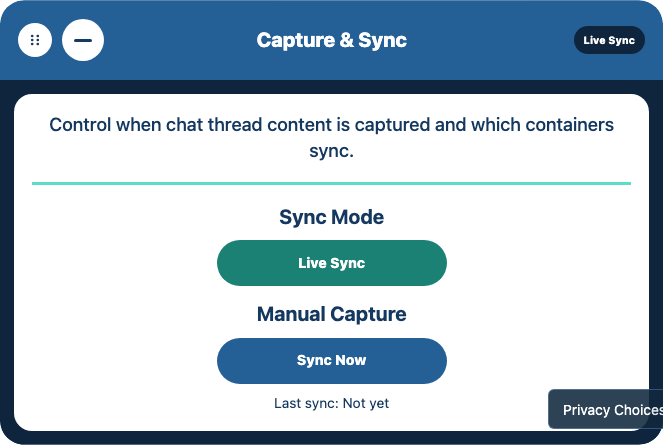
- Sync Mode: Choose whether to capture changes automatically.
- Sync Now: Save the currently open conversation immediately.
The Saved Chat Is Missing the Newest Messages
A saved chat can contain an earlier version of a conversation even when the AI website now shows more messages. Live Sync only watches an open conversation, so changes made elsewhere may need another capture. Compare the final message on the source page with the saved copy before retrying.
Check The Operation
Live Sync observes changes while a supported conversation page stays open. Manual capture requests another read of that page. Neither operation can read messages unavailable to the open browser page.
- Open the original conversation on the AI website, including any changes made on another device.
- Scroll to the newest reply. Wait until the full text is visible and the website no longer shows a response spinner or Stop button.
- Open SecondMindOS. Go to Settings > Workspace > Capture & Sync and click Sync Now.
- Open the saved chat and compare the last message with the original.
Expected Result
Expected result: Both copies include the same last message.
Choose The Next Check
Match the observed result to the checks below. A diagnostic check narrows the cause without deleting saved records or changing unrelated settings. Stop when the expected result is confirmed; unresolved results include the next responsible contact.
The Source Page Does Not Show The New Reply
Open the correct conversation on the original AI website and wait for the latest reply to finish loading. Capture cannot include content absent from the open page. A visible completed reply is the prerequisite for another Sync Now check.
Check the source account and conversation. If the content is unavailable on the provider website, contact that provider instead of resetting SecondMindOS.
The Source Reply Is Complete But The Saved Copy Is Older
Run Sync Now once and compare the last message again without deleting the existing saved chat. Matching messages close the capture check. A reproducible difference after manual capture establishes the information needed for a capture investigation.
Contact SecondMindOS support with the website name, timing, and location of the missing messages. Preserve the source and saved record; omit private message text from the initial report.
Previously Saved Chats Are Missing
An empty Chats view can mean a different browser profile or workspace is selected, rather than that records were deleted. Begin with those non-destructive checks using a remembered conversation title. A reset or reinstall is not a recovery step and can make the original data harder to preserve.
Check The Operation
A browser profile separates browser accounts, extensions, and stored data. A workspace separates collections within SecondMindOS. The same browser application can contain several distinct sets of saved conversations.
- Open SecondMindOS in the same browser profile used before. With multiple Chrome profiles, use the profile menu beside the address bar to return to the original profile.
- On Home, select the workspace where you saved the chats.
- Open Chats and look for a title you remember.
Expected Result
Expected result: The previous conversations appear in the selected workspace and a familiar saved chat opens with the expected messages.
Choose The Next Check
Match the observed result to the checks below. A diagnostic check narrows the cause without deleting saved records or changing unrelated settings. Stop when the expected result is confirmed; unresolved results include the next responsible contact.
The Original Profile Or Workspace Contains The Chats
Open a remembered chat and compare a familiar message with the expected saved content. The matching content shows that the earlier empty view belonged to another collection. No restoration or import is required.
Continue in the original profile and workspace. Create and verify a backup before any later removal or reset.
The Original Collection Is Still Empty Or Was Removed
Record whether the browser profile, extension, or workspace was deleted and whether a JSON workspace backup exists. A saved backup provides a recovery candidate; another profile check cannot reverse deletion. A backup must be imported and checked before recovery is established.
Contact SecondMindOS support before further changes when no backup is available or the cause is unclear. Preserve the original browser installation and any backup files.
Search Cannot Find a Conversation Visible in Chats
A conversation that opens in Chats is already saved, so the immediate question is why retrieval is not finding the record. A distinctive phrase from the saved messages provides a simple test. Start without filters, then reintroduce the intended scope after the phrase produces a result.
Check The Operation
Retrieval finds saved material matching a query. A filter narrows the eligible records, such as records belonging to one project. Processing prepares derived information used to find and present the saved source.
- Open the saved conversation and pick a distinctive phrase from the messages.
- Open Search, remove any project or source filters, and search for that phrase.
- If the chat’s Processed State card says Waiting or shows loading bars, keep the chat open until that card says Ready.
- Return to Search and submit the same phrase again.
Expected Result
Expected result: Search returns the saved conversation, and opening the result shows the distinctive phrase in the original saved messages.
Choose The Next Check
Match the observed result to the checks below. A diagnostic check narrows the cause without deleting saved records or changing unrelated settings. Stop when the expected result is confirmed; unresolved results include the next responsible contact.
The Result Appears After Removing Filters
Reapply the intended project or source filter and compare the saved chat's actual scope. A result that disappears only under a nonmatching filter indicates an excluded record, not lost content.
Correct the search scope and stop. If the expected filter excludes a matching record, report it to SecondMindOS support.
A Ready Chat Is Missing From An Unfiltered Search
Confirm that the distinctive phrase stays readable in Chats and that Processed State says Ready, then submit the phrase again. A readable source without a result after processing narrows the failure to retrieval. A persistent Waiting state instead points to unfinished processing.
Contact SecondMindOS support with the processing state and the difference between Chats and Search. Stop before deleting or reimporting the saved conversation.
A Selected File Was Not Added
Selecting a file and adding useful context are separate checkpoints. The file must be readable, the selected destination must be correct, and the result must appear in that scope. Begin with one small text or Markdown file containing a recognizable sentence before investigating a larger or more complex document.
Check The Operation
Context is source material available to a selected workspace, project, or chat. Markdown is plain text with formatting markers. The destination determines where the added material becomes available.
- Open the file from Finder, File Explorer, or the browser’s Downloads list. Confirm that the file opens and is not empty.
- Confirm that the file is 10 MB or smaller. If the file exists only in cloud storage, download a local copy before selecting the file in SecondMindOS.
- In SecondMindOS, open the workspace, project, or chat that should receive the file. Expand Sources, then open Add Context.
- In Destination, confirm the exact workspace, project, or chat name. Click Choose File and select the local file.
- Continue only after the form says “Loaded [file name] locally. Choose Add Context to save it.” Then click Add Context.
- When the form says “Context added to [destination],” reopen Sources in that destination and select the source by the file name.
Expected Result
Expected result: The item appears and contains text from the file.
Choose The Next Check
Match the observed result to the checks below. A diagnostic check narrows the cause without deleting saved records or changing unrelated settings. Stop when the expected result is confirmed; unresolved results include the next responsible contact.
The File Never Reaches The Loaded Status
Check that the file is available locally, nonempty, and no larger than 10 MB. Repeat with one small plain-text file containing a nonprivate test sentence. A working text file narrows the failure to the original file's availability or format. A PDF without extractable text needs an accessible text version.
Use a readable local file. If the small text example fails, contact SecondMindOS support with the error and file size, but do not send the private document.
The Form Reports Context Added But The Source Is Missing
Reopen Sources in the exact destination named by the completion message and look for the file name. Readable source text in that destination establishes completion. A missing source after reported completion needs a persistence or destination investigation before another addition.
Contact SecondMindOS support with the selected destination type and completion message. Avoid repeated additions until the original outcome is clear.
A Downloaded Markdown File Is Missing
A completed export normally creates a browser download rather than a new item inside the workspace. The browser's download history is the first place to check. Use one saved conversation with a recognizable title, and keep a readable Markdown export distinct from a workspace backup intended for restoration.
Check The Operation
An export creates a copy for use outside SecondMindOS. Markdown is a readable text format; a workspace backup preserves the structured records needed for recovery. A readable transcript is not interchangeable with a restorable backup.
- Open the browser’s Downloads list and look for the SecondMindOS file.
- Use the download’s Show in folder option, if available. Otherwise check Downloads/SecondMind.
- If you expected an automatic copy, open Settings > Workspace > Storage and check that Automatic Markdown Files is set to Save Markdown.
Expected Result
Expected result: You can open the file from the download location.
Choose The Next Check
Match the observed result to the checks below. A diagnostic check narrows the cause without deleting saved records or changing unrelated settings. Stop when the expected result is confirmed; unresolved results include the next responsible contact.
The Browser Lists A Completed Download
Use Show in folder or the browser's equivalent action, then open the downloaded Markdown file. Readable expected messages establish a completed transcript export. The download location may differ from the folder previously checked.
Stop after checking the file. Use a JSON workspace backup, rather than a Markdown transcript, to restore a workspace.
No Download Appears Or The Browser Reports A Failure
Check the browser's download status, then repeat one manual export from a saved nonprivate test chat and record the visible result. A browser-reported download failure points to the download path; no attempt or an application error points to the export operation.
Contact SecondMindOS support with the exact error and browser version. The browser administrator owns managed download restrictions; do not disable organizational controls.
AI Chat Cannot Connect to Ollama
Ollama can be installed without currently running a model service that the browser can reach. Connection checking comes before generation quality: first discover an installed model, then send a short message. A successful response in another application alone does not show SecondMindOS's browser connection.
Check The Operation
Ollama runs AI models on the local computer. A model is the installed set of learned parameters used to generate an answer; a model service is the running process receiving requests. Installation and service availability are separate conditions.
- Open the Ollama application on this computer.
- In SecondMindOS, open Settings > Quick Setup > AI Provider and choose Ollama. Click Check Ollama.
- Read the status below the model. Continue only when the status says “[model name] is ready to use.”
- If the status says the model is not installed, confirm the displayed download. Keep this panel open until the ready message appears.
- Return to AI Chat, verify that Ollama and the ready model are selected, then send the message again.
Expected Result
Expected result: AI Chat returns a reply rather than the connection error.
Choose The Next Check
Match the observed result to the checks below. A diagnostic check narrows the cause without deleting saved records or changing unrelated settings. Stop when the expected result is confirmed; unresolved results include the next responsible contact.
Check Ollama Reports A Missing Model
Choose an installed model or approve the displayed model download, then wait for the ready status before sending another message. A ready model followed by a short AI Chat reply establishes model availability and a working generation request.
You control local model installation. Stop when the reply succeeds. If a ready model still reports missing, contact SecondMindOS support.
Ollama Works Elsewhere But SecondMindOS Cannot Connect
Keep Ollama running, repeat Check Ollama, and record the exact connection error and selected model. Success in the dedicated application does not show browser access. A continued browser failure requires connection investigation, not deletion of saved chats.
Contact SecondMindOS support with the model name and error. Do not expose the local model service publicly or disable browser security as a connection repair.
AI Chat Omits a Saved Fact
Saving a fact does not guarantee that every AI request includes the source containing the fact. Context selection limits the material supplied to a request. Find the original sentence first, then inspect the selected sources and ask about one concrete detail so missing context can be distinguished from an incorrect model answer.
Check The Operation
A source is saved material supporting an answer. A context bundle is the selected material supplied to a particular request. Scope determines the workspace, project, or chat eligible to supply that material.
- Find the fact in Chats or Search to confirm the fact was saved.
- Use the product’s Context selector to choose the workspace, project, or chat that contains the saved fact. In AI Chat, type the question and use Review Context to inspect matching saved sources.
- Open Settings > Integrations > Context Bundles. Choose AI Chat under Integration, turn on Workspace Context, and include the sources you need. Try the question again.
Expected Result
Expected result: The reply uses the relevant saved fact. Compare the reply with the original text rather than trusting the answer alone.
Choose The Next Check
Match the observed result to the checks below. A diagnostic check narrows the cause without deleting saved records or changing unrelated settings. Stop when the expected result is confirmed; unresolved results include the next responsible contact.
The Saved Source Is Missing From Review Context
Confirm the source in Chats or Search, then compare the selected workspace, project, or chat with the Context Bundles source settings. The intended source appearing in Review Context establishes inclusion for the request. A saved source still absent after correcting scope points to context selection.
Contact SecondMindOS support with the selected scope and source settings if the source stays absent. Keep private source text out of the initial report.
The Source Is Included But The Answer Is Wrong
Ask one concrete question about the included source and compare the answer with the original sentence. A mismatch despite included evidence concerns answer quality, not proof that the saved record disappeared. The original source stays the basis for checking the fact.
Verify consequential facts against the source. Report reproducible errors in included context to SecondMindOS support without sending private content.
A Google Drive Backup Did Not Upload
A backup preview shows what would be included, but does not upload an archive. The first check is which action completed: preview or creation. A successful creation should report uploaded objects and produce a dated entry that can be found again, while the original local records stay available.
Check The Operation
A backup is an archive intended for later recovery. A preview reports the proposed contents without creating the archive. A passphrase protects the encrypted contents and must stay available for a later restore.
- Open Settings > Cloud Storage. Check that Google Drive is connected and select the data to back up.
- Set Backup Action to Preview Backup. Enter a backup passphrase of at least 12 characters, then click Preview Backup.
- Read the item counts shown below the controls. If the counts match the intended workspace, set Backup Action to Create Backup and click Create Backup.
- Read the Backup result line. Continue when the result says Completed and reports how many objects were uploaded.
- Click Find Backups and find the new entry by the date.
Expected Result
Expected result: The result reports an upload and the new backup appears in the list.
Choose The Next Check
Match the observed result to the checks below. A diagnostic check narrows the cause without deleting saved records or changing unrelated settings. Stop when the expected result is confirmed; unresolved results include the next responsible contact.
Only Preview Counts Appear
Confirm that Backup Action is Create Backup, then run Create Backup for the intended workspace and inspect the completion result. Preview counts describe proposed content without an upload. Completed upload counts and a dated Find Backups entry establish that an archive was created.
Keep the original records and passphrase. Run a restore preview before treating the archive as a recovery copy.
Creation Reports An Error Or Has An Uncertain Outcome
Record the exact error and use Find Backups to check for a new dated entry before another upload. Inspect any Drive permission error separately from a network timeout. If a new archive exists despite a missing completion response, inspect it before uploading again. If the connection was denied, reauthorize it through the supported control.
Contact SecondMindOS support when the archive outcome stays unclear or the error persists. Preserve local chats; never send the backup passphrase or provider authorization token.
A Drive Backup Cannot Be Unlocked
A listed Drive backup proves that an archive was found, not that the archive can be decrypted. Unlocking requires the passphrase used when the backup was created. Begin with a restore preview so the selected date, record counts, and conflicts can be inspected before any saved state changes.
Check The Operation
Decryption recovers readable data from encrypted contents using the correct passphrase. A restore preview reports the proposed records and conflicts, meaning differences requiring the restore operation to reconcile saved state.
- Open Settings > Cloud Storage and set Backup Action to Restore Preview.
- Enter the passphrase used when that backup was created, then click Find Backups.
- Choose the backup by the date and item count, then click Preview Restore.
- Read the conversation, knowledge-object, and conflict counts. Click Restore only when they match the backup you intend to use.
Expected Result
Expected result: The Restore result says Completed. Open Chats and compare one familiar conversation with the original copy.
Choose The Next Check
Match the observed result to the checks below. A diagnostic check narrows the cause without deleting saved records or changing unrelated settings. Stop when the expected result is confirmed; unresolved results include the next responsible contact.
The Archive Is Listed But Preview Cannot Unlock The Contents
Confirm the selected backup date and use the passphrase recorded when that archive was created. A successful preview exposes record and conflict counts. A replacement passphrase cannot decrypt an older archive, and a lost original passphrase cannot be recovered by support.
Preserve any remaining local originals. For a reproducible preview error with a known passphrase, contact SecondMindOS support without sending the passphrase or archive contents.
Preview Counts Or Conflicts Do Not Match The Intended Restore
Compare the backup date and counts with the intended workspace before choosing Restore. Unexpected counts or conflicts mean the effect on saved state stays unconfirmed. An unlocked archive alone does not show that restoration is appropriate.
Stop before Restore and contact SecondMindOS support about unexplained preview results. Restore only after you understand the target and effects.
Connecting a Knowledge Platform Did Not Add Anything
A connected service may have working access settings without having imported any content. Connection checks and synchronization answer different questions. First establish which operation is available in the installed version, then inspect the result of that operation rather than assuming that a connected label makes external notes searchable.
Check The Operation
A connection grants access to an external service. Import brings selected external material into SecondMindOS, while synchronization compares and updates records across the connection. Access credentials alone do not run either operation.
- Open Settings > Integrations > Knowledge Platforms and choose Notion, Obsidian, or Google Drive from Knowledge Platform.
- Check for Connect, Check Connection, and Notion API Token in the Notion card. These controls configure and test the connection; the controls do not import a page.
- If a Sync button appears after the service is connected, click Sync and read the result shown below the card.
- If there is no Sync button, that service cannot add provider items from this screen in the installed version.
- To add a file already on the computer, open the destination workspace, project, or chat. Expand Sources, open Add Context, and choose the file.
Expected Result
Expected result: The connection card reports its status. A file added through Sources appears in the destination you selected.
Choose The Next Check
Match the observed result to the checks below. A diagnostic check narrows the cause without deleting saved records or changing unrelated settings. Stop when the expected result is confirmed; unresolved results include the next responsible contact.
The Connection Succeeds But No Sync Control Exists
Inspect the selected provider card for an available Sync action in the installed version. Connection success establishes access only. Without a Sync control, the screen cannot import provider items; a downloaded local file can instead be added through Sources.
Stop checking the connection after access succeeds. Reconnecting or granting broader permissions will not add an unavailable import capability.
A Visible Sync Control Reports An Error
Record the result below the provider card and inspect the destination for content already added before repeating Sync. A permission denial concerns the workspace-authorized connection; partial content or a timeout requires checking the original outcome before retrying.
Reauthorize workspace access only through the supported control. Contact SecondMindOS support for an uncertain or repeated failure. Product infrastructure credentials do not belong in workspace settings.
The Account Shows an Earlier Plan After Payment
Signing in establishes an account session, while the browser still owns the local workspace. An account problem should be checked without deleting local conversations. Start with the displayed account state and the exact sign-in result before treating missing hosted access as a local-storage problem.
Check The Operation
An account session establishes a signed-in identity. A subscription records a purchased plan, and an entitlement determines the features the account may access. Local workspace records stay separate from that hosted account state.
- Check that you are signed in with the email address used for the purchase.
- Reload the account page once.
- If the plan is still wrong, send support the account email and receipt reference. Do not repeat the payment.
Expected Result
Expected result: The account shows the purchased plan, or support has the details needed to investigate the plan discrepancy.
Choose The Next Check
Match the observed result to the checks below. A diagnostic check narrows the cause without deleting saved records or changing unrelated settings. Stop when the expected result is confirmed; unresolved results include the next responsible contact.
The Action Was A Pro Waitlist Signup
Check whether the action opened the waitlist popup rather than a completed purchase with a receipt. A waitlist confirmation records interest and does not charge an account or change a plan. An unchanged plan is expected after signup.
Use the waitlist email checks for a missing confirmation. Stop payment troubleshooting when no purchase occurred.
A Purchase Receipt Exists But The Plan Is Unchanged
Confirm the signed-in account matches the purchase email and reload the account page once. A continuing discrepancy with the matching account requires reconciliation between payment and persisted account access.
Contact SecondMindOS support with the account email and receipt reference for billing investigation. Do not repeat payment, send payment-card details, or delete local workspace data.
The Waitlist Confirmation Email Did Not Arrive
Joining a waitlist records interest in a feature; the request does not activate a subscription. Begin by checking the result of the submission and the expected confirmation message. Keep the submitted address and any visible error available, but do not include passwords or private workspace content in a support report.
Check The Operation
A waitlist records interest in future availability. Email confirmation verifies access to the submitted inbox; confirmation does not create a paid subscription or grant paid features.
- Check the submitted inbox, including spam and promotions folders.
- Open the confirmation email, follow the link, and click Confirm Email on the page.
- If the confirmation email stays missing, contact support with the signup address and approximate time.
Expected Result
Expected result: After confirmation, the page displays the confirmed waitlist status.
Choose The Next Check
Match the observed result to the checks below. A diagnostic check narrows the cause without deleting saved records or changing unrelated settings. Stop when the expected result is confirmed; unresolved results include the next responsible contact.
Signup Succeeded But No Confirmation Email Appears
Check the submitted inbox, spam, and promotions folders and record the approximate signup time. A missing email after a successful submission needs a delivery check. Resubmitting the same active signup does not send another confirmation message.
Contact SecondMindOS support with the signup address and time. Do not send inbox credentials or unrelated email contents.
The Signup Popup Reported An Error
Record the exact error and distinguish the failed submission from a successfully saved signup. An error does not show that the signup was saved. One later retry is appropriate after the immediate failure clears.
Contact SecondMindOS support if the error repeats. A successful email confirmation verifies the inbox only; no paid subscription is activated.
A Waitlist Link Is Invalid
A waitlist email link belongs to a particular message and action. Reopening an older message can produce a different result from following the newest confirmation. Start with the latest email and preserve the exact error so an expired or already-used link can be distinguished from a delivery problem.
Check The Operation
A confirmation link carries a token associated with a particular email action. The token permits the intended confirmation flow and should not be included in a support report or shared as an ordinary page address.
- Open the newest waitlist email you received.
- If you unsubscribed and then signed up again, use the new confirmation email. It replaced the previous links.
- If the newest link still fails, contact support with the signup address. Do not send the authentication link.
Expected Result
Expected result: The new link opens a page with a Confirm Email or Unsubscribe button.
Choose The Next Check
Match the observed result to the checks below. A diagnostic check narrows the cause without deleting saved records or changing unrelated settings. Stop when the expected result is confirmed; unresolved results include the next responsible contact.
The Newest Email Opens The Expected Action Page
Read the action and select Confirm Email or Unsubscribe only when the displayed action is intended. Opening the link alone does not change the preference. The page's result after the button action establishes completion.
Stop after the expected result appears. Do not share the email link because its address contains an action token.
The Newest Link Still Reports Invalid
Check whether a newer signup followed an unsubscribe and record the error from the newest message's link. A newer signup replaces earlier links. An invalid newest link requires investigation without further preference changes.
Contact SecondMindOS support with the signup address, message time, and error text. Omit the full link and token from the report.
Create a Backup Before Removing SecondMindOS
Troubleshooting is easier when the last successful action is clear. For example, a conversation that opens in Chats but cannot be found in Search is different from a conversation that was never captured. Begin with the visible symptom and a small repeatable example before changing settings or removing data.
Check The Operation
A workspace backup contains structured saved records for recovery. JSON is the structured text format used by the local backup file. Downloading the file preserves a copy outside the extension; checking a restore shows whether the copy is usable.
- On Home, select the workspace you want to keep. Open Settings, then Workspace, then Import and Export.
- Under Back Up Workspace, click Download Backup.
- Open the browser’s Downloads list. Use Show in Folder or Show in Finder on the new .json file, then move or copy it to a folder you can find again.
Expected Result
Expected result: A copy of the selected workspace has been downloaded. Repeat these steps for every workspace that must be retained, giving each file a recognizable name. Leave the file unchanged.
Choose The Next Check
Match the observed result to the checks below. A diagnostic check narrows the cause without deleting saved records or changing unrelated settings. Stop when the expected result is confirmed; unresolved results include the next responsible contact.
A JSON Backup File Was Downloaded
Keep the original installation and import the backup into a separate browser installation, then open a familiar chat and project. Matching readable records establish a usable recovery copy for the checked workspace. File existence alone does not show a successful restore.
Check every workspace scheduled for removal. Stop before deletion if any required workspace lacks a verified backup.
Downloading Or The Test Import Fails
Preserve the original browser installation and backup file, then record the exact download or import error. A failed recovery check means removal could eliminate the remaining usable copy. Resetting the workspace cannot repair the backup.
Contact SecondMindOS support before uninstalling or deleting data. Share the error and environment, not the full workspace export.
Import a Saved Workspace Backup
A readable exported conversation and a restorable workspace backup serve different purposes. Local recovery needs the supported backup file, not merely a Markdown copy of a chat. Keep the original backup unchanged and inspect the proposed import before applying the restored state.
Check The Operation
A local workspace backup is a JSON file containing structured saved records. Import restores supported records from that file. A Markdown transcript preserves readable conversation text but does not contain the complete workspace backup structure.
- Open SecondMindOS in the browser where you want the saved work.
- Go to Settings > Workspace > Import and Export and click Import Backup. Choose the JSON file.
- Continue when Last import changes from Never to a date and time. Then open Chats and Projects and compare one familiar item in each with the original browser.
Expected Result
Expected result: The imported chats and projects can be opened in the destination browser.
Choose The Next Check
Match the observed result to the checks below. A diagnostic check narrows the cause without deleting saved records or changing unrelated settings. Stop when the expected result is confirmed; unresolved results include the next responsible contact.
The File Is Rejected
Confirm that the file is the JSON backup created by Download Backup, not a Markdown transcript or encrypted Drive archive. A different export format needs the matching recovery path. A rejected JSON workspace backup requires investigation with the original file preserved.
Contact SecondMindOS support with the error and backup origin. Do not rewrite the JSON or send the full backup as an initial report; Drive archives use the Drive restore controls.
Last Import Updated But Expected Records Are Missing
Confirm the destination workspace and compare one known chat and project with the original browser or verified source backup. An import timestamp shows that an import was recorded, not that every expected record is present. A mismatch needs record-level investigation before repeating the import.
Contact SecondMindOS support with the missing record types and import time. Preserve the source installation and backup; avoid repeated imports while the outcome is uncertain.
Contact and Feedback
Choose the address that best matches your request so it reaches the right support path.
Choose the Right Email
Start with product support for general feedback, questions, and problems. Use a specialized address when the topic clearly belongs to one of the categories below.
A useful support report explains the last successful action and the first unexpected result. For example, a conversation that opens in Chats but cannot be found through Search gives a clearer starting point than a report that search is broken. Email support@secondmindos.app with a short description and the details below. You do not need to send your library.
Postal correspondence can be sent to SecondMindOS, 197 Yonge Street, Suite 201 #1009, Toronto, Ontario M5B 0C4, Canada.
- Browser name and version, operating system, and SecondMindOS extension version; mention a local test build if applicable.
- The affected page, provider, or feature; what you expected and what happened instead.
- The smallest repeatable steps, the exact error, approximate time and timezone, and whether the failure occurs every time.
- Checks already attempted and whether the same action works in another workspace or with a short test note with no private information.
- An environment summary from Settings diagnostics with private details removed, if available. If the panel will not open, say so; diagnostics are not required to ask for help.
Review diagnostics and screenshots before sending. Remove API keys, OAuth tokens, authentication links, waitlist tokens, passphrases, personal identifiers, private URLs, and conversation or file contents. Never send a full workspace export as an initial report.
Choose Prepare a support report below, describe the problem, then select Preview report. Review the browser details and error text, remove private information, and choose Copy reviewed report to paste the reviewed report into the email.
Prepare a support report
Browser details and the extension version, when available, are added automatically. The report does not read your saved chats or files. Common secrets in error text are removed, but review the preview for other private details. Nothing is sent.
For a suspected vulnerability or exposed credential, use the security reporting instructions.