
Guides and setup
Documentation
Learn how to install, use, configure, and recover SecondMindOS. Start with a local capture, then explore projects, search, context, accounts, integrations, privacy, backup, and troubleshooting.
SecondMindOS gathers AI conversations, files, and webpages in a source-linked workspace. Find earlier work, verify it against the original source, and reuse it across projects or models. Local features in the extension work without an account. Free accounts can also use AI Chat and Settings in the web app. See Support when a step fails.
What SecondMindOS Does
SecondMindOS saves conversations, notes, files, and webpages. Its summaries, insights, decisions, and actions retain source links so you can verify and reuse them.
Search saved work, view connections, ask AI about selected sources, continue a captured chat with another model, organize projects, or export Markdown and context bundles.
Use Search Help in the navbar to find a topic or fix.
Save on The Computer
Extension work stays in the browser profile unless you export it or enable a paid cloud feature. Free web AI Chat, its settings, and selected context also stay in that browser.
Check the Original
Open a finding's source to check its wording and context.
Choose What AI Chat Can Read
Use Review Context to inspect sources before sending an AI Chat message.
Save and Find The First Conversation
Verify the local workflow with one completed conversation.
- Open a conversation
After installing SecondMindOS, open a chat in ChatGPT, Claude, Gemini, Grok, or Perplexity. Scroll to the final reply and continue when the full text is visible and the website no longer shows a response spinner or Stop button.
- Save the conversation in SecondMindOS
Open SecondMindOS, then Settings → Workspace → Capture & Sync. Under Manual Capture, click Sync Now.
- Check the saved messages
Open Chats and select the conversation. Check that the question and the completed reply appear.
- Find the saved conversation
Open Search, enter a phrase from the conversation, and open the matching result. If the result is missing, follow the search troubleshooting steps.
Install and Capture The First Thread
Install the browser extension and capture a short completed exchange. Local capture, search, and review do not require an account.
Chrome
Use Chrome's extension store and Extensions menu to install, pin, and open SecondMindOS beside a supported conversation.
- Open the Install Guide and choose the Chrome Web Store button.
- Choose Add to Chrome and review the permissions before granting access.
- Pin SecondMindOS from the Chrome Extensions menu for direct access to the sidepanel.
- Open a supported AI conversation, select SecondMindOS, and open the sidepanel.
Firefox
Use Firefox Add-ons and the Extensions menu to install and open SecondMindOS beside a supported conversation.
- Open the Install Guide and choose the Firefox Add-ons button.
- Choose Add to Firefox and review the permissions before granting access.
- Open Firefox's Extensions menu and select SecondMindOS.
- Open a supported AI conversation and launch the SecondMindOS sidepanel.
Use SecondMindOS on AI Chat Pages
Use response controls and highlights beside completed ChatGPT, Claude, Gemini, Grok, and Perplexity replies.
Use the Vertical Response Controls
Open a conversation and look along the right edge of the page. Use the SecondMindOS bar to open the sidepanel, save the current thread, search or move between replies, change how replies are displayed, or copy source-linked content.
The controls work without restyling the vendor page. Open Customize Platform UI to enable vendor site styling or a response border. Both appearance choices are off by default.
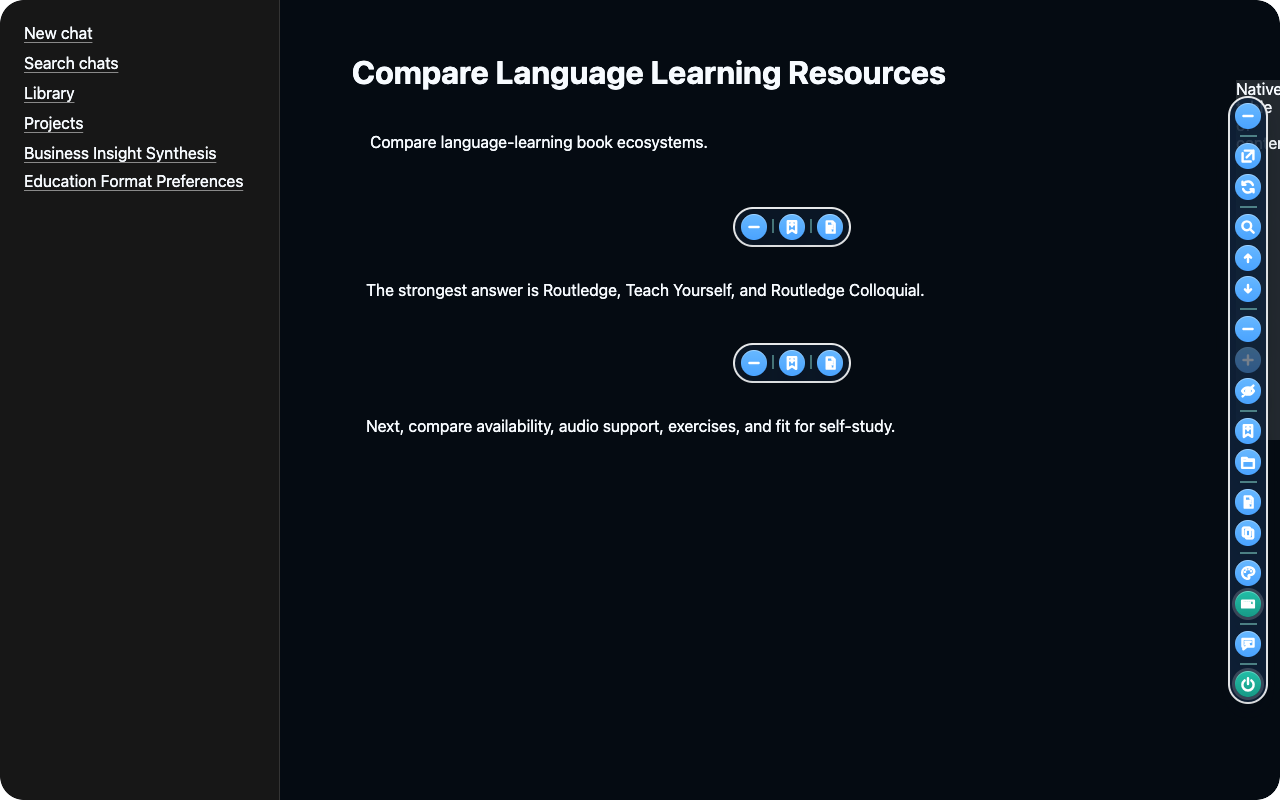
Save an Exact Text Highlight
Save an exact passage with its page, thread, and message source.
- Select at least a few words from a question or reply in the open conversation.
- In the toolbar beside the selection, choose Add to Home Highlights.
- Open SecondMindOS, then Home > Highlights, and find the saved text with the chat source.
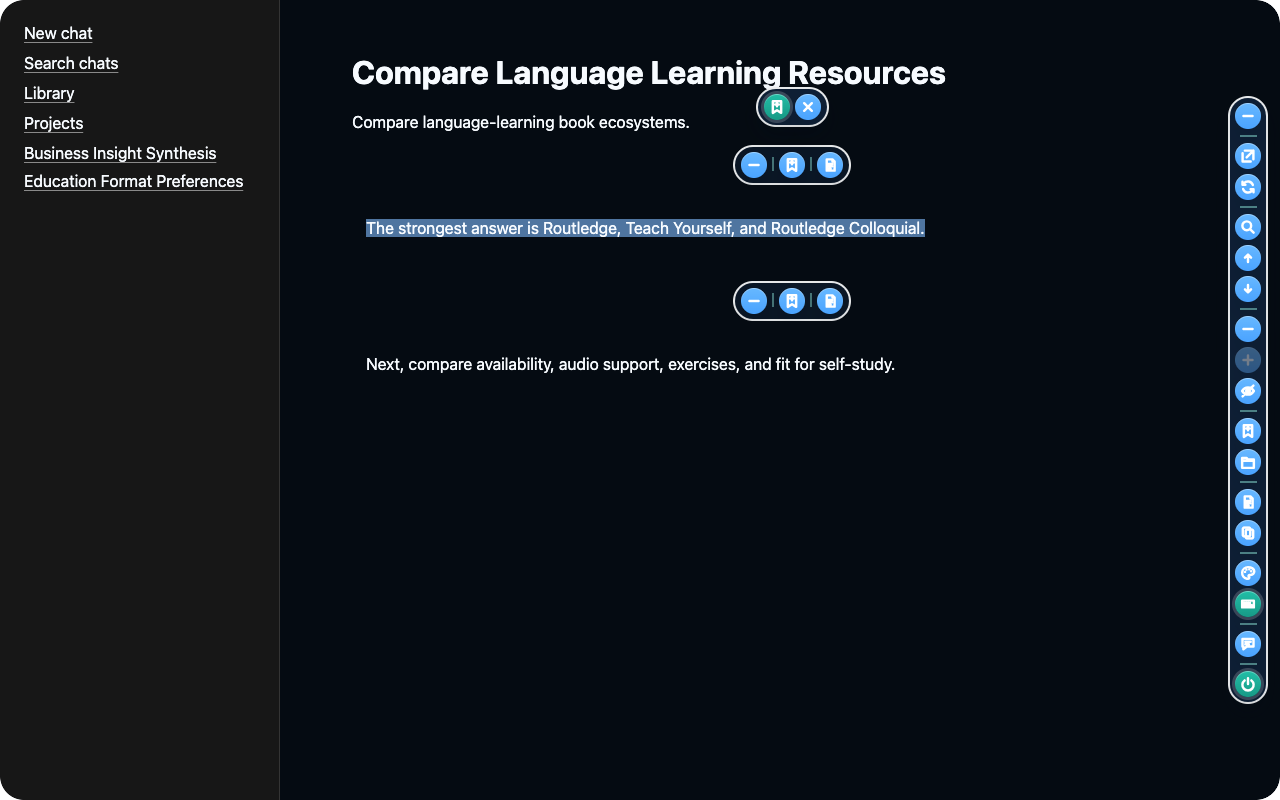
Each AI vendor's left navigation keeps its original structure and styling. SecondMindOS adds controls beside conversation content and in its own sidepanel only.
Where to Go for Each Task
Start with Search for an earlier decision, Chats for saved messages, or Projects for related work.
Home
Home shows the active workspace, sources, activity, projects, bookmarks, and storage health.
Start here to check the active workspace and saved work.
- Create and manage private local workspaces in the extension. Free web accounts can use AI Chat and Settings while other web pages remain available with a paid plan.
- Choose a workspace, project, or chat.
- Open workspace management to rename a workspace or manage the members.
- Check storage usage and recent changes in Workspace Overview.
- Open Bookmarked and filter decisions, insights, or actions.
- Use Sources > Add Context to paste a note or attach a file. Check the selected destination before saving.
Search
Search finds chats, insights, sources, projects, files, settings, and related context.
Use plain language or a specific name, decision, or topic.
- Search chats, projects, knowledge, files, sources, settings, and extracted records.
- Search a remembered phrase, client, or date. Remove filters if a result is missing.
- Click a result to open the page containing the saved item.
AI Chat
Ask a configured local or cloud model about saved chats, projects, and files.
For example, ask “What launch date was selected?” after saving a conversation containing the launch decision.
- On first use, Free guides you to install Ollama or add your own provider API key. A configured Plus account can use an available managed or personal model; Pro remains planned.
- Free AI Chat remains available in the web app and extension. Its chats, settings, selected context, and personal keys stay in that browser.
- Use Ollama, personal provider keys, or managed models available to the account.
- Check the selected workspace, project, or chat before sending.
- Choose Captured Chat to continue a saved conversation. The continuation is separate from the original capture.
- Attach supported multimodal files. SecondMindOS saves each upload as a source linked to the selected workspace, project, or chat. When local extraction succeeds, later AI Chat turns can retrieve its derived context. You can also rename chats, revisit history, copy transcripts, and save Markdown.
Chats
Chats keeps each transcript with its summaries, findings, highlights, and project controls.
Open a saved conversation to check the messages or copy the transcript.
- Open a supported conversation and click Sync Now.
- Keep the original captured transcript unchanged for later review or export.
- Choose Copy Full Transcript to copy every saved message as Markdown.
- Review summaries, insights, highlights, decisions, questions, actions, and related chats.
- Bookmark an insight or decision to find the finding later in Bookmarked.
- Rename a saved chat or assign the chat to a project using the card controls.
Projects
Projects group related chats, findings, notes, sources, and collaborators around one outcome.
Use a project for work with a shared outcome or deadline.
- Create a project or open one to edit it.
- Assign or remove chats from projects and assign projects to workspaces.
- Add notes, pasted text, files, highlights, questions, decisions, actions, webpages, PDFs, and API context.
- Bookmark a project insight or decision to retrieve the finding later.
- Team invitations and review of shared contributions are planned for Pro and are not available yet.
Visuals
Visuals turns source-linked records into graphs, timelines, coverage views, documents, matrices, and analytics.
For example, use Timeline to see how a decision changed over several conversations.
- Move from a workspace to projects, chats, and the chat graph.
- Choose Timeline to see activity by date, or a graph to follow links between saved items.
- Open an item's source, then use zoom and filters to focus the view.
Settings
Settings controls capture, privacy, storage, backup, integrations, AI models, accounts, and diagnostics.
Use Settings to change behavior or check service status.
- Review first-run choices through compact Quick Setup settings.
- Configure capture, local files, models, integrations, privacy, backup, and account access.
- In Workspace > Page Defaults, choose Workspace, Project, or Chat from the dropdown, then restore that scope to its product defaults. A confirmation appears before the change, and saved content is kept.
- Choose among 21 alphabetized product languages. Supported browsers translate interface copy on the device, configured AI models use the selected language for new replies and derived content, and Arabic uses a right-to-left layout. SecondMindOS, its tagline, and saved source content stay unchanged.
- See clear Available, Planned, Unavailable, Plus, and Pro capability states.
- Enter API keys only in the dedicated field for that provider. Do not paste keys into a note, chat, or support report.
Settings Control Pattern
Settings pair essential controls with status text. Guide buttons open detailed setup instructions.
Quick Setup
Choose the AI provider and the saved sources AI Chat can use.
Workspace
Change capture, Markdown storage, backup, language, and page-default settings.
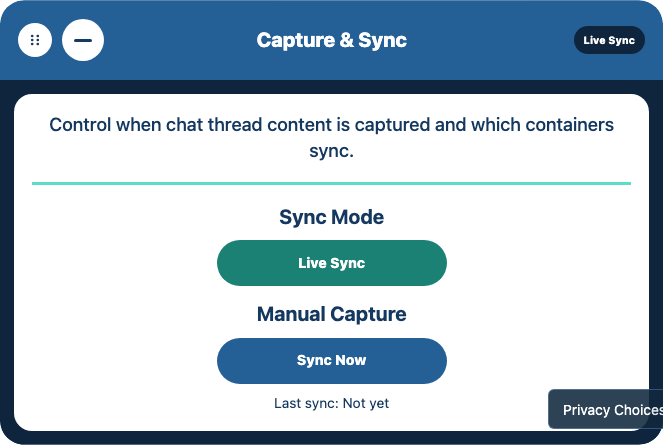
- Sync Mode: Choose whether to capture changes automatically.
- Sync Now: Save the currently open conversation immediately.
AI Providers
Choose a provider, then add its local address or cloud API key.
Integrations
Connect Notion, Obsidian, or Google Drive. Connecting alone does not import content.
Context Bundles
Choose which saved sources AI Chat or an integration can use and how to format them.
Cloud Storage
Connect Google Drive, preview a backup, then create or restore a verified copy.
Account and Plans
Sign in, check the plan, or manage billing. Plus checkout is limited to cleared paid markets. Pro opens its waitlist because it has not launched.
Hosted Services
Open setup guides for hosted services. Enter server credentials in the hosting service, not in the extension.
Projects and Workspaces
Projects group related chats, files, and webpages around one outcome while preserving each source.
Workspaces separate collections of projects and sources. Local workspaces stay in one browser profile; account workspaces add members and account controls.
Create a Focused Project
Create a project when several sources support one outcome, client, question, or deadline.
- Open Projects and create a project named for the task, such as Client Proposal.
- Attach the saved conversations and files about that proposal.
- Save the project, then reopen the project to check that the attached material is listed.
Reopen the project to confirm its sources. If one is missing, check its workspace and attachment.
Choose the Right Workspace
Use separate local workspaces for private work in one browser profile. Workspace creation is available on every plan. Open Home, expand Workspace Overview and Create Local Workspace, enter a name, then choose Create Workspace.
Signed-in Free accounts can also create account workspaces. Team invitations and shared collaboration controls are planned for Pro and are not available yet.
Use separate workspaces when similar projects need different sources or participants.
Create a Custom Content Container
Workspaces, Projects, and Chats include a custom-container form immediately before the feedback section. Use it when the standard containers do not cover a domain-specific question or workflow.
- Enter the subtitle, container title, and short description that should appear on the page.
- Choose whether the container should evaluate all saved content or only the current workspace, project, or chat thread.
- Enter a filter criterion and press Enter to create a bubble. Add more criteria as needed, up to 24.
- Choose Create Container. SecondMindOS saves the definition and processes each eligible conversation through the same grounded AI pipeline used by the standard containers.
- Review the child containers that appear beneath it. Each result is tied to source-message evidence and stays empty when the saved material does not support a result.
Choose Edit Container Inputs to revise the purpose, content scope, or criteria. Saving creates a new definition revision and reprocesses eligible saved conversations, so results from the old inputs are not shown as current. Choose Remove Custom Container to remove the definition and its derived view.
How Saved Work Becomes Reusable Context
Reusable context links an original source, a derived finding, and the request that uses it.
In SecondMindOS, a saved chat that says “Move the launch to Friday” can remain linked to a separate launch-decision finding and an AI Chat launch summary.
Source Records
The source is the original saved material: for example, the chat containing “Move the launch to Friday.” Open the source when you need the full conversation rather than a summary.
Knowledge Objects
A knowledge object is one saved finding, such as “Launch moved to Friday.” The finding might be a decision, question, action, or insight. Read the source link to check the surrounding messages.
Evidence and Relationships
A source link shows where a finding came from. A related item might be “Tell the team about Friday,” connected to the launch decision. Follow these links to check why an action was suggested.
PDF and Webpage Text
A saved PDF keeps the original file and extracts selectable text locally with PDF.js. Scanned pages can use local optical character recognition (OCR) when page rendering is available. A saved webpage keeps the captured HTML snapshot and creates clean text by removing scripts, styles, and markup while preserving readable breaks.
The clean text is split into overlapping source-linked chunks for search and AI context. SecondMindOS stores this derived text as a document record. It creates Markdown when you copy or export the source rather than replacing the original PDF or HTML with a Markdown file.
What a Context Bundle Contains
A context bundle is a selection of saved text prepared for one request. If you ask for a launch update, the bundle might include the launch decision, the original chat, and a related project note.
Choose which source types AI Chat or an integration may use in Settings > Context Bundles. SecondMindOS selects matching material from those sources; context selection does not necessarily include every saved word.
Original Work and Exported Copies
The saved chat and the findings stay in the library. An exported bundle is a separate copy made for a particular request. Deleting that exported file does not delete the original chat.
After a launch date changes, save the updated conversation and regenerate the summary. An earlier exported summary stays a snapshot of the earlier source state until a new export is created.
Website Monitoring can check a public HTTPS page manually or once per day. SecondMindOS makes an anonymous request, checks the site's robots.txt rules, and saves only passages that match the workspace, project, or chat topics you selected.
Before turning it on, confirm that you are allowed to monitor the page, that its terms permit automated checks, and that you can lawfully use any personal data it contains. A public page is not automatically free of copyright, privacy, or contractual limits.
Choose What AI Chat or an Integration Can Use
Context controls determine the source material available to AI Chat or a connected service. Verify the selection against one recognizable chat before enabling a larger collection.
- Open Settings > Integrations > Context Bundles and choose AI Chat, API, Model Context Protocol (MCP), or another integration.
- For AI Chat and other connected integrations, turn Workspace Context on to allow saved material for that selection.
- For API or MCP, choose Workspace, Project, or Chat Thread, then choose the specific saved target the external application may use. Choose No Context to disable access.
- Choose Chats And Projects, Knowledge And Documents, All Saved Context, or No Sources.
- Choose a format. Source-Linked Brief keeps references; Concise Message shortens the handoff.
- Return to the destination and make the request. Use Review Context before sending saved sources to a cloud provider.
- Verify the answer against its sources. If context is missing, check the workspace and Sources settings.
Open the service card and read the visible buttons. Connect and Check Connection configure and test a connection. Connection checks do not add provider content to SecondMindOS.
A connected card shows Sync only when that service can add content in the installed version. If Sync is absent, use Sources > Add Context to add a local file.
In Settings, expand Integrations, then open Context Bundles and choose the destination under Integration. For example, allow Chats And Projects for AI Chat without allowing the same sources for another integration. Choosing sources does not send a request.
Common Tasks, Step by Step
Choose a task below. Each workflow lists its prerequisites, steps, and expected result.
Save and Revisit a Useful Chat
Prerequisites: Install the extension and open a supported conversation whose final reply is fully visible and no longer shows a response spinner or Stop button.
- Open a conversation in ChatGPT, Claude, Gemini, Grok, or Perplexity and open the SecondMindOS sidepanel.
- Open Settings > Workspace > Capture & Sync and click Sync Now. Open Chats and check that the messages were saved.
- Give the saved chat a recognizable name using the rename control.
- Later, search for that name in Search to reopen the conversation.
Expected Result: The saved thread reopens from Search with the messages intact.
Keep an External Chat Up to Date
Prerequisites: Open a supported conversation that was saved earlier.
- Turn on Live Sync to notice changes while a supported conversation remains open in the browser.
- After a conversation changes while SecondMindOS is closed, reopen that conversation and the SecondMindOS sidepanel.
- Choose Sync Now to capture the open conversation immediately instead of waiting for Live Sync.
- Open the saved conversation in Chats and check that the newest messages appear.
Expected Result: The saved thread includes the latest completed messages.
Find an Earlier Decision
Prerequisites: Save the conversation or source that contains the decision.
- Open Search and describe the decision, client, feature, or problem in ordinary language.
- Start without filters. If there are too many results, choose the relevant project or source type and search again.
- Open the matching result and review the source before reusing the result.
- If the answer refers to another chat or project, open that link and read the original messages before reusing the decision.
Expected Result: The matching source opens for verification in context.
Bookmark a Useful Finding
Prerequisites: Open a saved insight, decision, or action item.
- On Home, Chats, or Projects, find an insight or decision worth keeping and click the Bookmark button.
- Open Bookmarked below the overview cards. Look for the saved finding and the link to the original source page.
- Use the Category filter to show a specific type such as Key Insight, Decision, or Action Item.
- Copy the saved item for portable text, or remove the bookmark after the saved reference is no longer needed.
Expected Result: The finding appears in Bookmarked with a source link.
Copy a Complete Saved Transcript
Prerequisites: Save the conversation and open the conversation in Chats.
- Open Chats and choose the saved thread for reuse.
- Expand the thread details and choose Copy Full Transcript.
- Wait for the button to say Copied, then paste the Markdown into the destination.
- If copying fails, allow clipboard access and try again. The saved thread is not changed.
Expected Result: The destination contains the full saved transcript as Markdown.
Export Portable Workspace Data
Prerequisites: Save the chats and projects you want to keep, then open the relevant workspace or project.
- Choose the copy or export action for the workspace or project.
- Save the Markdown file in an Obsidian vault or another folder you control.
- Review its YAML metadata, source links, attachments, and complete chat transcripts.
- Keep the embedded machine-readable backup when you may want to import the library into SecondMindOS again.
Expected Result: The downloaded Markdown preserves the nested workspace, project, chat, and transcript structure for Obsidian and other Markdown tools.
Create Another Workspace
Prerequisites: Open Home in the browser profile that will hold the new workspace.
- Open Home, expand Workspace Overview, then open Create Local Workspace.
- Enter a non-empty workspace name. The Create Workspace button becomes available after a name is entered.
- Click Create Workspace, then check that the name appears in the workspace selector.
- Select the required workspace before adding projects or saving chats.
Expected Result: The workspace selector includes the new workspace.
Edit a Project
Prerequisites: Create or select the project that requires an update.
- Open Projects and expand the project that requires a change.
- Use the project’s edit controls to change the name or description, choose the workspace, or change the attached chats and context.
- Click Save Project. Reopen the project and check that the changes appear.
Expected Result: The reopened project shows the saved changes.
Use Saved Research in AI Chat
Prerequisites: Save the relevant research and configure an available AI Chat model.
- Open Projects and choose the project for the task, such as a client proposal.
- Add the saved conversations and files that contain the client’s requirements, then click Save Project.
- Use the product’s Context selector to choose that project, then open AI Chat. Type a specific question, such as: What changes did the client request for the proposal? Use Review Context before sending to inspect the selected saved sources.
- Compare the answer with the attached source material before using the answer. If the answer misses a saved fact, use the AI Chat troubleshooting card below.
Expected Result: AI Chat returns an answer for comparison with the selected sources.
Ask Product Help Without Changing The Active Context
Prerequisites: Configure an available AI Chat model. Product Help uses the same selected model.
- Open AI Chat and choose Help above the message box.
- Ask a question about SecondMindOS. Product Help uses the public documentation and does not retrieve saved workspace, project, chat, or file context.
- Continue asking product questions while Product Help Is On is visible. Help turns are not saved into the active AI Chat or processed into its context.
- Choose Exit Help to return to the previous conversation exactly where you left it. New messages can use the selected saved context again.
Expected Result: The help exchange answers from public SecondMindOS documentation while the active context conversation remains unchanged.
Continue a Captured Chat with Another Model
Prerequisites: Save the original conversation and configure the required model.
- Capture the source conversation from ChatGPT, Claude, Gemini, Grok, or Perplexity.
- Open AI Chat > Model Configuration > Captured Chat and select the saved conversation.
- SecondMindOS creates a separate continuation with the original title followed by Continued in SecondMindOS. The source capture remains unchanged.
- Choose an available configured model and send the message. If automatic Markdown saving is enabled, look for the copy in the AI Chats folder under the configured download subfolder.
Expected Result: A separate continuation contains the new exchange; the captured source is unchanged.
Understand Knowledge Platform Connections
Prerequisites: Open Settings > Integrations > Knowledge Platforms. Connecting or checking a service does not import its documents.
- Choose Notion, Obsidian, or Google Drive from Knowledge Platform.
- Use Connect to save the connection. Use Check Connection to test the connection. Neither action adds provider content to SecondMindOS.
- A connected service shows Sync only when the installed version can add content from that service. Click Sync and read the result shown below the card.
- If Sync is absent, add a local file through Sources > Add Context instead.
Expected Result: Connection status confirms access; Sync confirms an import when supported.
Adjust Language and Accessibility
Prerequisites: Open the workspace whose appearance settings require a change.
- Open Settings, expand Workspace, then open Appearance.
- Choose a language from the alphabetized Product Language list.
- Supported browsers translate interface copy on the device. Arabic also switches the interface direction to right-to-left.
- Choose a palette, text size, line spacing, motion level, and layout density that are comfortable to use.
- Turn on stronger focus indicators, solid surfaces, or underlined links when those cues make navigation and reading easier.
- The selected preference is saved for the next session. Configured AI models use it for new replies and derived content. SecondMindOS, its tagline, and saved source content stay unchanged.
Expected Result: Language, reading, motion, contrast, and keyboard-focus preferences apply immediately and remain available after reopening the product.
Download a Backup Before Moving or Resetting
Prerequisites: Keep the original browser profile available until the imported backup passes verification.
- On Home, select the workspace for backup. Open Settings, expand Workspace, then open Import and Export.
- Under Back Up Workspace, click Download Backup. Open the browser’s Downloads list and use Show in Folder or Show in Finder on the new .json file.
- Keep that file in a recognizable folder. The backup covers the selected workspace; repeat the operation for every workspace that must be retained and give each file a recognizable name. Leave the JSON unchanged.
- On the destination browser, open the same Import and Export section and click Import Backup. Choose the JSON file. Continue when Last import changes from Never to a date and time.
- Open a familiar chat and project in the destination and check the contents before removing the original installation. If the download or import fails, keep the original browser profile and contact support.
Expected Result: A downloaded JSON file restores familiar chats and projects in the destination.
Privacy, Sync, and Backup
Local storage, sync, and backup are separate. Local chats work without sign-in; enabled services transfer only the selected data.
What Stays on Your Device
These features work in your browser or through a local service on the same computer.
- Browser storage and local search
- Built-in text and code parsing
- Local PDF and optical character recognition (OCR) processing
- Ollama requests to the local service
- Markdown files exported to local storage
When Data Is Sent
Selected data is sent only when you connect a service and choose an action that needs it.
- Content you choose to sync with a connected service
- Encrypted backup contents and the basic information needed to find and restore a backup
- Workspace information included in account sync after you turn it on
- Cloud AI requests after Review Context shows which saved sources will be shared
- Information sent to Discord or n8n after you connect and use those services
Raw and derived workspace content in hosted account sync uses TLS, encryption at rest, and account access controls. It is not encrypted with the backup passphrase because authorized hosted services process synced records for account features. Product configuration settings remain service-readable and, subject to your analytics choices, may be used to understand feature use and improve SecondMindOS. Saved workspace content is not used for behavioral analytics or model training.
Create an Encrypted Google Drive Backup
Open Settings > Cloud Storage and connect Google Drive. Select content, choose Preview Backup, and enter a passphrase of at least 12 characters. Check the counts, choose Create Backup, and wait for Completed. Save the passphrase; restoration requires it.
The provider can still see limited manifest metadata such as backup date, object categories, sizes, and integrity hashes. The provider cannot read the backed-up workspace content.
Restore a Google Drive Backup
Choose Restore Preview, enter the original passphrase, and click Find Backups. Select a backup, preview its counts, and restore it. After Completed appears, verify a familiar chat. Use Import Backup for downloaded JSON backups. On another device, enter the same passphrase that encrypted the selected cloud backup.
Accounts and Plans
Local extension capture works without sign-in. A Free account can use AI Chat and Settings in the web app with browser-only storage. Hosted workspace sync, connectors, and billing features require the appropriate account plan.
Free Local Use
Create multiple local workspaces and projects, capture, search, inspect, export, and use self-hosted local intelligence in the extension's browser profile. In the web app, Free keeps AI Chat and Settings enabled and stores their product data in that browser.
When to Sign In
Sign in to use the web app or manage an account. Signing in to Free does not upload the local library. Paid plans can add hosted workspace access, account sync, connected services, and billing management. You can create or access an account with email and password, Google, or GitHub. A verified OAuth email that matches an existing account opens that same account instead of creating a second library.
After confirming a new account, you receive one welcome email with links to the product, installation, getting-started, privacy, and support pages. If you forget your password, use Forgot Password on the sign-in page and follow the time-limited recovery link sent to your email. The same recovery flow lets an account created with Google or GitHub add a password.
Every sign-in finishes with a secure email link. SecondMindOS asks you to authenticate again after seven days. The email step confirms access to the account inbox and is separate from authenticator-app MFA.
Browsers, Folders, and Multiple Accounts
Chrome profiles and Firefox keep separate browser-local libraries. A Free account does not automatically synchronize those browser libraries. To exchange files through a local library folder, approve the same physical or cloud-synchronized parent folder in each browser and run Sync Local Folder in each one. Each browser must receive folder permission separately.
When both browsers use the same signed-in account, SecondMindOS uses the same account subfolder under SecondMind/Accounts. If the browsers use different physical folders, each folder keeps a separate identity so removing a file from one folder does not remove context imported from the other. Account sync on an eligible paid plan merges supported browser records into the same account without deleting either browser's unique local work.
Different signed-in accounts always use different account subfolders, even when their email names are similar. Signing out leaves every account folder intact and returns local activity to the unsigned library. SecondMindOS never deletes files from the selected folder during synchronization.
Paid Capabilities
Plus provides the supported connectors, cloud backup, and managed models listed on the pricing page when those services are configured. Plus can be purchased in cleared paid markets. Pro remains on a waitlist until launch. The Free plan remains available elsewhere, and you do not need Pro to create a local workspace.
To manage or cancel a paid plan, open Settings in the extension or web app, then open Billing. The Billing card shows the current plan, subscription status, and billing-period end date. Select Manage Billing to open Stripe, where you can update payment details, view invoices, or cancel. Paid access continues through the displayed billing-period end date after cancellation. Uninstalling the extension does not cancel billing.
Configure Local Integrations Safely
Local integrations can add files, notes, models, and advanced local connections without a hosted account. Start with a small file or local model.
Keep credentials in their dedicated fields and grant only the access required for the workflow.
Private Browser Storage
Saved sources, projects, extracted insights, and local AI conversations stay in the browser profile running SecondMindOS. Local storage does not require an account or server.
- Availability
- Implemented
- Access method
- Product controls
- Account and plan
- Free. No account needed for the local path
- Setup status
- Check readiness in the product
Use the browser profile that owns the saved workspace.
- Open SecondMindOS in the usual browser profile.
- Save a conversation, then open Chats and confirm the messages appear.
- Close and reopen the panel. The saved conversation should still be listed.
Good to know: Before removing the extension or moving to another browser, download a workspace backup using the backup guide.
Local Library, Files, and Pasted Context
Use a user-owned folder for saved AI chats, generated intelligence, and indexed context. You can also paste raw text, Markdown, notes, or code, or upload a supported file up to 10 MB.
- Availability
- Implemented
- Access method
- Product controls
- Account and plan
- Free. No account needed for the local path
- Setup status
- Check readiness in the product
Choose a supported file no larger than 10 MB. Image and PDF extraction may need local engines.
- Open Settings, then Workspace, then Storage. Under Local Library Folder, choose Sync Local Folder to connect the default Downloads/SecondMind folder, or Change Folder to choose another location.
- Use Finder or File Explorer to add, remove, and organize files inside the generated workspace, project, and chat Files folders. SecondMindOS synchronizes those changes while the extension is active.
- The Backups folder contains a restorable snapshot of saved AI chats, generated intelligence, and indexed context. These user-owned files remain available if the extension is uninstalled. Reinstall SecondMindOS and use Import Backup to restore the snapshot.
- Open Home for workspace context, Projects for project context, or Chats for chat context.
- Open Sources, then use Add Context to choose the target workspace, project, or chat.
- Choose a supported local file or paste raw text, Markdown, notes, or code into the form.
- Choose Add Context. That explicit action validates the target, extracts the source locally, and adds the knowledge directly to that workspace, project, or chat without a second review step.
Good to know: Keep the folder in a location you control. If you move it, use Change Folder to reconnect the new location. If a PDF’s text cannot be read, paste a text copy instead.
Markdown Files
Markdown files are readable copies of chats and summaries. Open Markdown files in a text editor or a notes app.
- Availability
- Implemented
- Access method
- Product controls
- Account and plan
- Free. No account needed for the local path
- Setup status
- Check readiness in the product
Enable automatic Markdown copies for automatic downloads.
- Open Settings > Workspace > Storage. Set Automatic Markdown Files to Save Markdown to create automatic copies.
- Open a supported conversation and click Sync Now. Check the browser’s Downloads list for the Markdown file.
- Look in the AI Chats folder under Downloads/SecondMind, or under the download subfolder selected in Storage. Requested summaries use the Summaries folder.
- To add an existing Markdown note to SecondMindOS, use Sources > Add Context and select the file or paste the text. Import Backup accepts a SecondMindOS JSON backup, not an ordinary Markdown file.
Good to know: The Markdown file does not automatically appear on another computer. For a complete workspace copy that SecondMindOS can import, use Settings > Workspace > Import and Export > Download Backup.
Obsidian
Obsidian appears in the Knowledge Platform selector. Entering a label does not grant the connection card access to a vault folder.
- Availability
- Implemented
- Access method
- Product controls
- Account and plan
- Free. No account needed for the local path
- Setup status
- Check readiness in the product
Select Obsidian in Knowledge Platforms. Use only the connection, Sync, or Import controls visible in the installed build.
- Open Settings, then Integrations, then Knowledge Platforms, then Obsidian.
- Enter a recognizable Vault Label for the connection, then click Connect.
- If Sync appears after connecting, use Sync to add supported content. If Sync is absent, this card cannot import a vault in the installed version.
- To add a Markdown file with the current local workflow, open Sources > Add Context, click Choose File, and then click Add Context after the loaded-file message appears.
Good to know: Do not assume that entering a vault label grants folder access. A browser folder picker must appear before SecondMindOS can receive folder permission.
Ollama
Ollama runs compatible language and vision models on the computer so private analysis can stay on the device.
- Availability
- Implemented
- Access method
- Product controls
- Account and plan
- Free. No account needed for the local path
- Setup status
- Check readiness in the product
Start Ollama and install a compatible local model.
- Install Ollama for the operating system and start the Ollama application or local service. To start the service from a terminal instead of the app, run:
ollama serve - Install a model. Use a smaller model first if the computer has limited memory.
ollama pull llama3.2:1b - Open SecondMindOS Settings, expand Quick Setup, then open AI Provider and choose Ollama. Detailed local-model controls are also available under Free, then Self-Hosted Intelligence.
- Keep the default loopback URL, or save a different localhost port if the Ollama service uses one.
- Choose a model and click Check Ollama. Continue only when the status says “[model name] is ready to use.” If the status says the model is not installed, review the displayed size, confirm the download, and keep the panel open until the ready message appears.
- If Ollama stops, use Start Ollama when the optional companion is installed. Otherwise start the Ollama application manually and choose Check Ollama or Retry Check, whichever is displayed.
- Keep Ollama selected for a local request. SecondMindOS will not switch a failed local request to a cloud model automatically.
Good to know: Ollama must run on the local computer. A failed message can be retried against the local service; SecondMindOS does not silently route local requests to cloud AI.
LM Studio
Use an LM Studio model through the local OpenAI-compatible server without sending workspace content to a cloud model.
- Availability
- Implemented
- Access method
- Automatic discovery, not an AI Chat option
- Account and plan
- Free. No account needed for the local path
- Setup status
- Check readiness in the product
Start the local server on port 1234. Auto Managed may select another runtime first.
- Load a model in LM Studio and start the local server on port 1234.
- In SecondMindOS, open Settings > Free > Self-Hosted Intelligence. Set Runtime to Auto Managed. The current interface does not have a separate LM Studio provider choice.
- Capture a short test conversation, open the conversation in Chats, and expand Processed State. A Ready badge and an insight count show that local processing produced output. Auto Managed chooses among available runtimes; selecting Auto Managed does not prove that LM Studio handled that conversation.
Good to know: LM Studio generates local insights through the server on port 1234. To chat with a local model in AI Chat, use Ollama.
Self-Hosted n8n
Connect a self-hosted n8n instance for scoped automation. Start with read-only access.
- Availability
- Implemented
- Access method
- Product controls
- Account and plan
- Plus or higher. Account required
- Setup status
- Check readiness in the product
Configure the account-linked service, endpoint, and scoped key. Start read-only; writes require an exposed approval interface.
- Start the self-hosted n8n instance and copy the HTTPS base URL.
- Sign in to SecondMindOS, then open Settings, Integrations, Automation, and n8n.
- Enter the n8n Workspace URL, choose the smallest Authentication Scope, and keep Permission Mode set to Read Only.
- Click Check Connection. After a successful check, click Create Key and copy the one-time key into an n8n credential.
- Build and test the workflow in n8n with disposable sample data.
- Keep Permission Mode set to Read Only for initial setup. The connection card does not show or approve proposed workspace changes.
Good to know: Copy the API key when the key appears; the complete key is shown only once. Use Read And Write only after separately verifying the workflow and approval controls.
Set Up Supported Integrations
Check each provider's status and supported action. Planned tools are visible for roadmap context but cannot connect or change settings.
Authorization grants access; import copies content; backup creates a recoverable archive. Connecting alone does not run an import or backup.
AI Conversation Capture
Open a supported conversation, click Sync Now, then verify it in Chats.
- Availability
- Implemented
- Access method
- Product controls
- Account and plan
- Free. No account needed for the local path
- Setup status
- Check readiness in the product
Install the extension and allow access to the supported conversation page.
Cross-Model Chat Continuation
In AI Chat, choose Captured Chat and a saved conversation. The continuation stays separate from the original.
- Availability
- Implemented
- Access method
- Product controls
- Account and plan
- Free. No account needed for the local path
- Setup status
- Check readiness in the product
Choose a ready provider and model. Managed cloud access uses the SecondMindOS account; advanced user-key mode requires a separate provider credential.
Obsidian
Open Obsidian under Knowledge Platforms. If Sync or Import is unavailable, add a Markdown file through Sources > Add Context.
- Availability
- Implemented
- Access method
- Product controls
- Account and plan
- Free. No account needed for the local path
- Setup status
- Check readiness in the product
Select Obsidian in Knowledge Platforms. Use only the connection, Sync, or Import controls visible in the installed build.
Ollama
Start Ollama locally, install a supported model after explicit download approval, and validate the model in Settings before using private saved context in AI Chat.
- Availability
- Implemented
- Access method
- Product controls
- Account and plan
- Free. No account needed for the local path
- Setup status
- Check readiness in the product
Start Ollama and install a compatible local model.
LM Studio
LM Studio can supply local insight extraction through Auto Managed discovery on port 1234. LM Studio is not a selectable AI Chat provider, and another available local runtime may be chosen first.
- Availability
- Implemented
- Access method
- Automatic discovery, not an AI Chat option
- Account and plan
- Free. No account needed for the local path
- Setup status
- Check readiness in the product
Start the local server on port 1234. Auto Managed may select another runtime first.
Google Drive
Connect Google Drive in Cloud Storage. Preview the backup with a passphrase, check its counts, then create it and wait for Completed.
- Availability
- Planned or unavailable
- Access method
- Product controls
- Account and plan
- Plus or higher. Account required
- Setup status
- Unavailable in this build
Configure Google Drive, connect the account, and keep the backup passphrase.
Notion
Configure and check Notion under Knowledge Platforms. Content moves only through a visible Sync or Import action.
- Availability
- Implemented
- Access method
- Product controls
- Account and plan
- Plus or higher. Account required
- Setup status
- Check readiness in the product
Save a valid Notion token and use Check Connection. Import requires a visible Sync or Import action.
Discord
Under Communication Platforms, enter the server and channel IDs, choose a context target, connect, and check the status.
- Availability
- Planned or unavailable
- Access method
- Product controls
- Account and plan
- Plus or higher. Account required
- Setup status
- Unavailable in this build
The deployment must configure Discord OAuth; connect the account and map approved channels.
Slack
Slack is planned. The current Communication Platforms screen provides Discord controls and does not provide a Slack connection form.
- Availability
- Planned or unavailable
- Access method
- Product controls
- Account and plan
- Plus or higher. Account required
- Setup status
- Unavailable in this build
The deployment must configure Slack OAuth; connect the account and map approved channels.
n8n
Under Automation, enter the n8n Workspace URL, use the smallest scope and Read Only mode, then check the connection and create a one-time key.
- Availability
- Implemented
- Access method
- Product controls
- Account and plan
- Plus or higher. Account required
- Setup status
- Check readiness in the product
Configure the account-linked service, endpoint, and scoped key. Start read-only; writes require an exposed approval interface.
MCP and Agent CLI
Model Context Protocol (MCP) and the Agent CLI can retrieve explicitly scoped context. Their write actions create a preview that must be approved before SecondMindOS changes saved knowledge.
- Availability
- Implemented
- Access method
- Advanced local setup
- Account and plan
- Free. No account needed for the local path
- Setup status
- Check readiness in the product
Open Settings > Integrations > Context Bundles, choose MCP, select an external context scope, and follow the setup guide for the approved MCP client.
Cursor and Claude Desktop
Cursor and Claude Desktop can use the same configured MCP connection. Choose its context scope in Settings; the connection cannot bypass that scope or directly apply a proposed write.
- Availability
- Implemented
- Access method
- Advanced local setup
- Account and plan
- Free. No account needed for the local path
- Setup status
- Check readiness in the product
Open Settings > Integrations > Context Bundles, choose MCP, select an external context scope, and follow the setup guide for the approved MCP client.
OneDrive, Dropbox, Amazon S3, Cloudflare R2, Backblaze B2, Google Docs, SharePoint, OneNote, Confluence, Microsoft Teams, GitHub, Jira, Linear, Gmail, Outlook, Google Calendar, Zapier, Make, and additional OpenAI-compatible local AI runtimes are roadmap items in the landing catalog.
Do not enter credentials for a provider marked Planned. Wait until the Settings card reports an implemented connection path.
Common Questions
Local work is not shared or uploaded automatically. Check the source, destination, and action before enabling a service.
Can I Ask How SecondMindOS Works without Changing My AI Chat?
Yes. Turn on Help in AI Chat to ask questions grounded in the public SecondMindOS documentation. Help does not retrieve saved workspace context or add its messages to the active conversation. Turn Help off to continue the previous conversation.
Where Do Bookmarks Appear?
Open Bookmarked under Home, Chats, or Projects. It shows saved findings, source links, and a Category filter.
Do External Chats Update Automatically?
Live Sync updates a supported conversation while its page is open. SecondMindOS does not secretly poll provider history while the page is closed. Reopen the conversation and sidepanel or choose Sync Now to update the saved copy.
Is an Account Required?
No. Local capture, search, review, export, and local intelligence can work without an account. Sign in for configured hosted continuity, cloud backup, and hosted integrations. Team collaboration remains planned for Pro.
Can a Free User Create More Than One Workspace?
Yes. Multiple private local workspaces and signed-in account workspace creation are available on Free. Adding collaborators and shared collaboration controls are planned for Pro and are not available yet.
Where Is Local Workspace Data Stored?
Local data stays in the current browser profile and does not appear automatically elsewhere. Removing extension data can delete it.
Does Local AI Upload Workspace Content?
No. Built-in processing, Ollama AI Chat, and LM Studio insight extraction run locally. LM Studio is not currently an AI Chat provider. Use Review Context before sending selected sources to a cloud provider.
How Can Integration Access Be Restricted?
Limit access in the provider first. Connect and Check Connection do not import content; use Sync only after verifying the account and workspace.
Are Planned Integrations Active?
No. Planned controls are roadmap indicators. A planned control should not connect, change settings, or send data.
Is Backup the Same as Sync?
No. Backup creates a recoverable copy; sync aligns selected data. Preview Drive restores, or use Import Backup for a downloaded JSON copy.
Can SecondMindOS or the Storage Provider Read a Cloud Backup?
The provider receives encrypted backup content and readable backup metadata. The passphrase stays on the device and cannot be recovered by SecondMindOS or the provider. Restoring on another device requires the original passphrase. Hosted account sync is separate: it uses TLS, provider encryption at rest, authentication, and account access controls, but authorized hosted services process synchronized records and the sync data is not end-to-end encrypted with the backup passphrase.
What Happens After Selecting Upgrade to Pro?
Upgrade to Pro currently opens the waitlist because Pro has not launched. The planned price is $24.99/month/seat. Submit and confirm your email to receive launch updates; joining the waitlist does not start a subscription or charge you.
Can Workspace Data Be Exported Before Removing SecondMindOS?
Yes. Download a backup for each workspace under Settings > Workspace > Import and Export. Use Markdown for readable copies, and verify exports before deleting data.
What Information Belongs in a Support Report?
Include the browser version, extension version, affected integration, and short reproduction steps. Never send API keys, OAuth tokens, or unredacted private content.
Troubleshoot the Common Problems First
Start with the observed symptom and the last successful step. Keep the original data while running these checks.
Use the card that matches the symptom. Back up data before moving or removing the extension.
SecondMindOS Opens, but the Panel Is Blank
A blank panel can look like a missing workspace, but the interface and the saved records are separate. Begin by reopening the panel and checking that the extension is enabled. Avoid uninstalling or resetting the workspace during an interface check, because those actions can remove data without explaining the blank screen.
- Close the SecondMindOS panel, then reopen the panel from the browser’s Extensions menu.
- If the panel stays blank, open the browser’s extension manager: chrome://extensions in Chrome or about:addons in Firefox. Turn SecondMindOS off, then back on.
- Open SecondMindOS again.
Expected result: You can see the SecondMindOS navigation and open Chats.
For a continuing failure: Tell support that the panel is blank and name your browser. Do not uninstall or use Reset Workspace to recover the interface.
A Newly Saved Conversation Is Missing from Chats
A conversation visible on an AI website is not yet proof of a saved SecondMindOS copy. Capture needs access to the open page and a completed visible response. Keep the original tab open, then save a short recognizable exchange and compare the last message in Chats with the source.
- Open the conversation on the original AI website and scroll to the final reply.
- Wait until the full reply is visible and the website no longer shows a response spinner or Stop button.
- Open SecondMindOS, then Settings > Workspace > Capture & Sync. Under Manual Capture, click Sync Now.
- Open Chats. Select the conversation by the title and compare the final message with the original tab.
Expected result: The conversation is listed in Chats, and you can read its messages.
For a continuing failure: If nothing appears, check whether the browser has blocked SecondMindOS’s access to that website. Grant access if needed, reload the conversation tab, and retry once. Capture does not run in private or incognito windows.
Previously Saved Chats Are Missing
An empty Chats view can mean a different browser profile or workspace is selected, rather than that records were deleted. Begin with those non-destructive checks using a remembered conversation title. A reset or reinstall is not a recovery step and can make the original data harder to preserve.
- Open SecondMindOS in the same browser profile used before. With multiple Chrome profiles, use the profile menu beside the address bar to return to the original profile.
- On Home, select the workspace where you saved the chats.
- Open Chats and look for a title you remember.
Expected result: The previous conversations appear in the selected workspace and a familiar saved chat opens with the expected messages.
For a continuing failure: Deleting the browser profile, removing the extension, or using Reset Workspace cannot be undone by checking another profile. Use the import guide below when a saved JSON backup exists. Otherwise contact support before making more changes.
A Selected File Was Not Added
Selecting a file and adding useful context are separate checkpoints. The file must be readable, the selected destination must be correct, and the result must appear in that scope. Begin with one small text or Markdown file containing a recognizable sentence before investigating a larger or more complex document.
- Open the file from Finder, File Explorer, or the browser’s Downloads list. Confirm that the file opens and is not empty.
- Confirm that the file is 10 MB or smaller. If the file exists only in cloud storage, download a local copy before selecting the file in SecondMindOS.
- In SecondMindOS, open the workspace, project, or chat that should receive the file. Expand Sources, then open Add Context.
- In Destination, confirm the exact workspace, project, or chat name. Click Choose File and select the local file.
- Continue only after the form says “Loaded [file name] locally. Choose Add Context to save it.” Then click Add Context.
- When the form says “Context added to [destination],” reopen Sources in that destination and select the source by the file name.
Expected result: The item appears and contains text from the file.
For a continuing failure: If an error appears, send support the text, the file type, and file size. If a PDF opens but contains no readable text, try an accessible text version. Do not send a private document just to demonstrate the error.
AI Chat Cannot Connect to Ollama
Ollama can be installed without currently running a model service that the browser can reach. Connection checking comes before generation quality: first discover an installed model, then send a short message. A successful response in another application alone does not show SecondMindOS's browser connection.
- Open the Ollama application on this computer.
- In SecondMindOS, open Settings > Quick Setup > AI Provider and choose Ollama. Click Check Ollama.
- Read the status below the model. Continue only when the status says “[model name] is ready to use.”
- If the status says the model is not installed, confirm the displayed download. Keep this panel open until the ready message appears.
- Return to AI Chat, verify that Ollama and the ready model are selected, then send the message again.
Expected result: AI Chat returns a reply rather than the connection error.
For a continuing failure: If the error says the model is missing, choose an installed model or approve a model download. If Ollama works in the dedicated app but not SecondMindOS, send support the model name and exact error.
AI Chat Omits a Saved Fact
Saving a fact does not guarantee that every AI request includes the source containing the fact. Context selection limits the material supplied to a request. Find the original sentence first, then inspect the selected sources and ask about one concrete detail so missing context can be distinguished from an incorrect model answer.
- Find the fact in Chats or Search to confirm the fact was saved.
- Use the product’s Context selector to choose the workspace, project, or chat that contains the saved fact. In AI Chat, type the question and use Review Context to inspect matching saved sources.
- Open Settings > Integrations > Context Bundles. Choose AI Chat under Integration, turn on Workspace Context, and include the sources you need. Try the question again.
Expected result: The reply uses the relevant saved fact. Compare the reply with the original text rather than trusting the answer alone.
For a continuing failure: An AI model can still miss or misread information. Ask about one detail at a time, such as “What launch date was selected?” If the source is never included, report the selected source settings to support.
A Google Drive Backup Did Not Upload
A backup preview shows what would be included, but does not upload an archive. The first check is which action completed: preview or creation. A successful creation should report uploaded objects and produce a dated entry that can be found again, while the original local records stay available.
- Open Settings > Cloud Storage. Check that Google Drive is connected and select the data to back up.
- Set Backup Action to Preview Backup. Enter a backup passphrase of at least 12 characters, then click Preview Backup.
- Read the item counts shown below the controls. If the counts match the intended workspace, set Backup Action to Create Backup and click Create Backup.
- Read the Backup result line. Continue when the result says Completed and reports how many objects were uploaded.
- Click Find Backups and find the new entry by the date.
Expected result: The result reports an upload and the new backup appears in the list.
For a continuing failure: If the upload fails, keep the original chats and copy the error. Check the internet connection and any Drive permission error before retrying. Reset Workspace does not fix an upload problem.
Connecting a Knowledge Platform Did Not Add Anything
A connected service may have working access settings without having imported any content. Connection checks and synchronization answer different questions. First establish which operation is available in the installed version, then inspect the result of that operation rather than assuming that a connected label makes external notes searchable.
- Open Settings > Integrations > Knowledge Platforms and choose Notion, Obsidian, or Google Drive from Knowledge Platform.
- Check for Connect, Check Connection, and Notion API Token in the Notion card. These controls configure and test the connection; the controls do not import a page.
- If a Sync button appears after the service is connected, click Sync and read the result shown below the card.
- If there is no Sync button, that service cannot add provider items from this screen in the installed version.
- To add a file already on the computer, open the destination workspace, project, or chat. Expand Sources, open Add Context, and choose the file.
Expected result: The connection card reports its status. A file added through Sources appears in the destination you selected.
For a continuing failure: If a visible Sync button fails, send support the service name and exact message shown below the card. Do not send the token or private provider content.
Quick Answers for Common Symptoms
Use these short answers when you recognize the symptom but do not yet know which full troubleshooting checklist applies.
The SecondMindOS Icon Is Missing
A missing address-bar icon does not necessarily mean SecondMindOS has been removed. The extension may still be installed but unpinned or disabled. Check the browser's extension list first; opening the panel from that list distinguishes an icon-placement problem from an installation problem.
Open the steps for this problem →The Saved Chat Is Missing the Newest Messages
A saved chat can contain an earlier version of a conversation even when the AI website now shows more messages. Live Sync only watches an open conversation, so changes made elsewhere may need another capture. Compare the final message on the source page with the saved copy before retrying.
Open the steps for this problem →Search Cannot Find a Conversation Visible in Chats
A conversation that opens in Chats is already saved, so the immediate question is why retrieval is not finding the record. A distinctive phrase from the saved messages provides a simple test. Start without filters, then reintroduce the intended scope after the phrase produces a result.
Open the steps for this problem →A Downloaded Markdown File Is Missing
A completed export normally creates a browser download rather than a new item inside the workspace. The browser's download history is the first place to check. Use one saved conversation with a recognizable title, and keep a readable Markdown export distinct from a workspace backup intended for restoration.
Open the steps for this problem →A Drive Backup Cannot Be Unlocked
A listed Drive backup proves that an archive was found, not that the archive can be decrypted. Unlocking requires the passphrase used when the backup was created. Begin with a restore preview so the selected date, record counts, and conflicts can be inspected before any saved state changes.
Open the steps for this problem →The Account Shows an Earlier Plan After Payment
Signing in establishes an account session, while the browser still owns the local workspace. An account problem should be checked without deleting local conversations. Start with the displayed account state and the exact sign-in result before treating missing hosted access as a local-storage problem.
Open the steps for this problem →The Waitlist Confirmation Email Did Not Arrive
Joining a waitlist records interest in a feature; the request does not activate a subscription. Begin by checking the result of the submission and the expected confirmation message. Keep the submitted address and any visible error available, but do not include passwords or private workspace content in a support report.
Open the steps for this problem →A Waitlist Link Is Invalid
A waitlist email link belongs to a particular message and action. Reopening an older message can produce a different result from following the newest confirmation. Start with the latest email and preserve the exact error so an expired or already-used link can be distinguished from a delivery problem.
Open the steps for this problem →Create a Backup Before Removing SecondMindOS
Troubleshooting is easier when the last successful action is clear. For example, a conversation that opens in Chats but cannot be found in Search is different from a conversation that was never captured. Begin with the visible symptom and a small repeatable example before changing settings or removing data.
Open the steps for this problem →Import a Saved Workspace Backup
A readable exported conversation and a restorable workspace backup serve different purposes. Local recovery needs the supported backup file, not merely a Markdown copy of a chat. Keep the original backup unchanged and inspect the proposed import before applying the restored state.
Open the steps for this problem →Include the browser version, extension version, affected integration, and the shortest reproduction steps. Remove API keys, tokens, private chat text, file contents, and personal identifiers.
Open support informationSecondMindOS Terminology
These definitions distinguish original sources, derived findings, and context prepared for another task.
Capture
Save the currently open supported conversation, webpage, or PDF into SecondMindOS.
Source
The original chat, file, webpage, API response, or connected service record behind saved information.
Provenance
The source details that let you check where a saved claim or finding came from.
Workspace
The broadest organizational area contains projects, chats, files, members, and shared settings.
Project
A focused collection of chats, sources, decisions, and actions for one outcome.
Knowledge Object
One reusable finding, such as an insight, decision, question, action, risk, or resource.
Context and Context Bundles
Context is the saved information supplied to a search, model, project, or integration for the current task. A context bundle is a temporary, source-labeled selection of that context prepared for one model or integration request.
Local
Stored or processed in the current browser profile or on the computer rather than a SecondMindOS cloud service.
Sync
Keep selected information aligned between approved locations or devices.
Backup
A recoverable snapshot can be previewed and restored later. Backup creation does not show live synchronization.
Connector
An integration connects SecondMindOS to another service. Saving connection settings establishes configuration; content moves only through the corresponding product operation.
Continue From A Verified Source
Find a saved thread through Search and verify it against the original conversation. Add a project, model, or connection only when the next task needs it.